BrushPuffStudio FREE
Ready to color

A leafy umbrella

TinyPuff - Young Explorer

Original lines protected
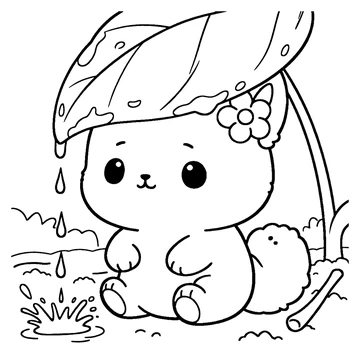
TinyPuff sits beneath a large leaf as raindrops splash into a puddle.Coloring requires a browser with Canvas support. You can download and print the original sample instead.
Opening your page…A little imagination goes a long way.
Pick a color. Tap a space. Make it yours.
No account. No uploads. Just a little you-time.
FREE ONLINE COLORING

A little space to color. A whole world to explore.

TinyPuff sits beneath a large leaf as raindrops splash into a puddle.

Original sample from TinyPuff - Young Explorer. Choose a color and tap a space with Fill, or use Brush and Pencil to make your own marks. No account required.

Print the original blank sample (PDF)

Color online, or take it to paper.

Download your colored picture as a PNG, print your finished page, or print the original blank sample. Progress is saved in this browser on this device when storage is available. Download your artwork to keep a separate copy.

These samples are for personal coloring enjoyment. The original illustrations remain © BrushPuff. Privacy · Explore the books · Activities

WELCOME TO YOUR LITTLE STUDIO

A little color goes a long way.

Choose a color, then tap a space with Fill. Switch to Brush or Pencil to make your own marks. Your original outlines are always protected.

Make your mark

Fill recolors an entire printed region, including any brush marks inside it. Brush and Pencil paint freely; “Stay inside the lines” keeps each stroke in its starting region.

Eraser removes your colors, never the illustration. Undo brings back your last action. Pencil uses a fine, translucent stroke.

Make yourself comfortable

Use Move or hold Space to pan. Pinch with two fingers to zoom; use the +/− controls or Ctrl/Cmd + mouse wheel on desktop. Fit returns the whole page to view.

Progress is saved on this device when available, not to a cloud account. Browser storage can be cleared. Download a copy to keep your art. Use one tab at a time: if two tabs edit the same sample, the last save replaces the earlier save.

Keyboard shortcuts

Fill GBrush BPencil PEraser EColor picker IMove HUndo Ctrl / ⌘ ZRedo Ctrl / ⌘ ⇧ ZFit page 0Download Ctrl / ⌘ S

Keyboard coloring: focus the canvas, use arrow keys to select a fillable region, then press Enter to color it. Region selection is announced. Original blank samples are also available in Print.

STRAIGHT FROM OUR BOOKS

Pick your next little adventure.

Two original pages. As many possibilities as you can imagine.

Each page keeps its own colors. Saving requires available browser storage; download a copy to keep.

A fresh little start?

This clears your colors from the current page. The original picture and your other sample stay untouched.

A LITTLE SOMETHING YOU MADE

Keep your creation.

Save a crisp PNG with your colors and the original linework. No watermark.

Preview of your colored page

The larger file is enlarged from the workspace; it does not add illustration detail.

MAKE A LITTLE TIME OFFLINE

Take it to paper.

Print your own creation, or start with the untouched book sample.

AN ORIGINAL BRUSHPUFF PAGE

A leafy umbrella

From the bookSource pageArtworkOriginal outlines, never redrawn

Scene names in the Studio are descriptive labels, not titles printed in the books. © BrushPuff. For personal coloring enjoyment.

Explore the book